
This guide will walk you and your fellow developers through detailed steps on how to start a new project development using the Integration API Developer Portal.
Introduction
Integration Developer provides a set of Application Programming Interfaces (APIs) that allow you to integrate Integration's functionalities into your project. This guide will explain how to create an account, obtain credentials to start building and testing your project, and connect it to the development, staging, or production environments. Various APIs are available for you to use in building your project. Let’s get started!
Access to APIs
To access the Integration API Catalog, you must first authenticate yourself. Please register through the Integration API Developer Portal and wait until your account is activated by Integration.
(Note: After registration, you will receive an email with an activation link. Click the link to complete your registration process.)
Once your account is activated, you’ll be able to explore the API documentation based on the available APIs.
Development and Testing
Before you begin, make sure you are signed in to your account to access the documentation.
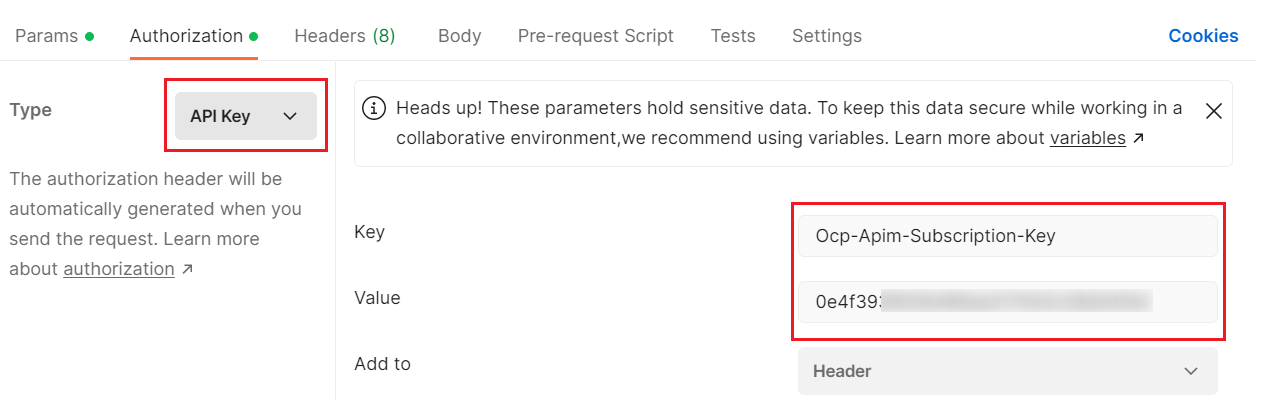
For easier implementation, please note that when using the API, you must include a Subscription Key in the request header using the key name:Ocp-Apim-Subscription-Key as shown in the Postman example below.
Authentication Methods
API Subscription Key
Purpose:
Security for accessing the Integration API Developer Portal.
HTTP Header:Ocp-Apim-Subscription-Key
When is it provided?
The Subscription Key is issued for API testing purposes. It becomes active once your request is approved and will be sent via email by AstraFMS.
Another Subscription Key will be issued after your Go-Live request has been validated.
There are two Subscription Keys allocated for each product: Primary Key and Secondary Key.
Only one key, either the Primary Key or the Secondary Key, should be used in the HTTP header Ocp-Apim-Subscription-Key.
Go-Live
After successfully testing your setup with the Integration test APIs, follow these steps:
Create a user account on the Integration API Developer Portal. This account will be used to manage your production project.
This user will also receive important updates related to the APIs, including version changes, maintenance notifications, new APIs, and more.
Based on your request, we will configure your account and provide the necessary API Key, authentication details, and endpoint URL so you can access our production system.